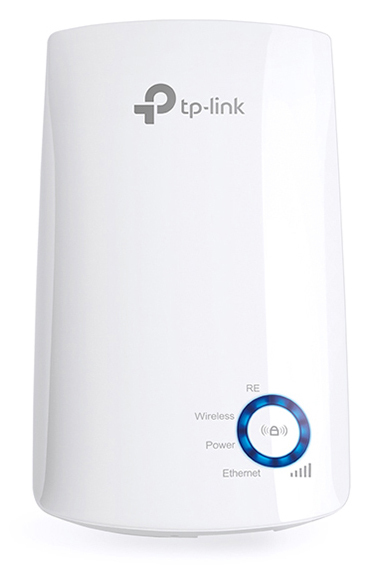
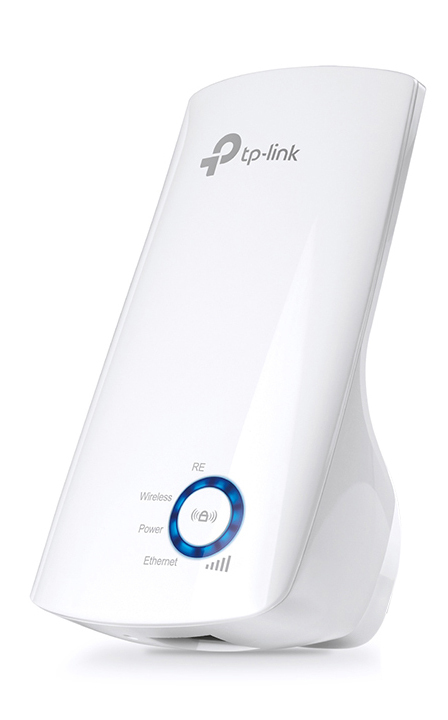
- Range Extender mode boosts wireless signal to previously unreachable or hard-to-wire areas flawlessly
- Miniature size and wall-mounted design make it easy to deploy and move flexibly
- Easily expand wireless coverage at a push of Range Extender button
- Ethernet port allows the Extender to function as a wireless adapter to connect wired devices
- Tether App allows easy access and management using any mobile device
- LED Control function includes a Night Mode for peaceful sleep
Boost Your Wireless Network
Tired of Wi-Fi ’’dead zone’’? TP-Link’s range extender connects to your router wirelessly, strengthening and expanding its signal into areas it can’t on its own. The device also reduces signal interference to ensure reliable Wi-Fi coverage throughout your home or office.
Easy Setup and
Flexible Placement
Press the WPS button on your router and the Range Extender button on your 850RE within 2 minutes to easily connect to the network. Once connected with an existing router, you can simply unplug and plug the TL-WA850RE back in a location for the best signal quality and coverage in your house, without needing to configure the extender again.
Ethernet Bridge
The TL-WA850RE’s single Ethernet port allows the Extender to function as a wireless adapter to connect wired devices like Blu-ray® players, gaming consoles, DVRs and Internet TVs. At the same time, the device can share the wireless network as well.
Smart Signal Indicator Light
5 signal lights show the strength of signal that TL-WA850RE receives from the existing router, which can help to find the right location to place the range extender.
It’s recommended that you choose a location where at least 3 signal light blue in order to guarantee a good performance.
Tether App for
Easy Use
Use any mobile device to easily access and manage various features, including the LED Control function's Night Mode, which allows you to enjoy a more peaceful night's sleep.
- Miniature size and wall-mounted design make it easy to deploy and move flexibly
- Easily expand wireless coverage at a push of Range Extender button
- Ethernet port allows the Extender to function as a wireless adapter to connect wired devices
- Tether App allows easy access and management using any mobile device
- LED Control function includes a Night Mode for peaceful sleep
Boost Your Wireless Network
Tired of Wi-Fi ’’dead zone’’? TP-Link’s range extender connects to your router wirelessly, strengthening and expanding its signal into areas it can’t on its own. The device also reduces signal interference to ensure reliable Wi-Fi coverage throughout your home or office.
Easy Setup and
Flexible Placement
Press the WPS button on your router and the Range Extender button on your 850RE within 2 minutes to easily connect to the network. Once connected with an existing router, you can simply unplug and plug the TL-WA850RE back in a location for the best signal quality and coverage in your house, without needing to configure the extender again.
Ethernet Bridge
The TL-WA850RE’s single Ethernet port allows the Extender to function as a wireless adapter to connect wired devices like Blu-ray® players, gaming consoles, DVRs and Internet TVs. At the same time, the device can share the wireless network as well.
Smart Signal Indicator Light
5 signal lights show the strength of signal that TL-WA850RE receives from the existing router, which can help to find the right location to place the range extender.
It’s recommended that you choose a location where at least 3 signal light blue in order to guarantee a good performance.
Tether App for
Easy Use
Use any mobile device to easily access and manage various features, including the LED Control function's Night Mode, which allows you to enjoy a more peaceful night's sleep.
Specificaties
| Design | |
|---|---|
| Kleur van het product | White |
| LED-indicatoren | Ja |
| Reset button | Ja |
| Netwerk | |
|---|---|
| Ethernet LAN data rates | 10,100 |
| Ethernet LAN interface type | Fast Ethernet |
| Networking standards | IEEE 802.11b,IEEE 802.11g,IEEE 802.11n |
| Cabling technology | 10/100Base-T(X) |
| Wi-Fi | Ja |
| Wi-Fi standards | 802.11b,802.11g,Wi-Fi 4 (802.11n) |
| Wi-Fi band | Single-band (2.4 GHz) |
| Top Wi-Fi standard | Wi-Fi 4 (802.11n) |
| Wi-Fi data rate (max) | 300 |
| Poorten & interfaces | |
|---|---|
| Ethernet LAN (RJ-45) ports | 1 |
| Energie | |
|---|---|
| Power consumption (typical) | 3.3 |
| AC input voltage | 100 - 240 |
| AC input frequency | 50 - 60 |
| Gewicht en omvang | |
|---|---|
| Breedte | 110 |
| Diepte | 66 |
| Hoogte | 75 |
| Inhoud van de verpakking | |
|---|---|
| Quick start guide | Ja |
| Eisen aan de omgeving | |
|---|---|
| Bedrijfstemperatuur (T-T) | 0 - 40 |
| Temperatuur bij opslag | -40 - 70 |
| Relatieve vochtigheid in bedrijf (V-V) | 10 - 90 |
| Luchtvochtigheid bij opslag | 5 - 90 |
| Certificaten | |
|---|---|
| Certificaten van naleving | RoHS |
| Verpakking | |
|---|---|
| Breedte verpakking | 156.5 |
| Diepte verpakking | 101.5 |
| Hoogte verpakking | 89 |
| Gewicht verpakking | 200 |
| Logistieke gegevens | |
|---|---|
| Code geharmoniseerd systeem (HS) | 85176990 |
| Minimale systeemeisen | |
|---|---|
| Mac operating systems supported | Ja |
| Linux operating systems supported | Ja |
| Mac compatibility | Ja |
| Beheerfuncties | |
|---|---|
| WPS push button | Ja |
| Antenne | |
|---|---|
| Antenna type | Internal |
| Antennas quantity | 2 |
| Zendvermogensgebied | 0 - 20 |